A Quiet Hour for Watching a Place’s Screens
A quiet hour of screen observation helps you map visibility, attention, and shared-space effects without photographing or identifying anyone nearby.
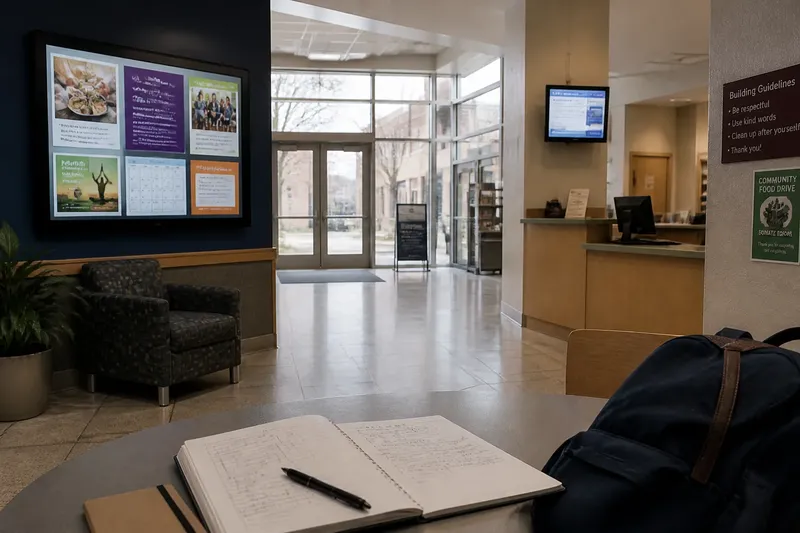
At a library entrance, a display may face the doorway while a smaller screen glows beside the service desk. During a quiet hour of screen observation, you can notice how placement shapes what people see and do without recording anyone’s face, name, or conversation. The point is to understand the setting, not to study individuals.
Choose a public or community space where you are welcome to sit, such as a library lobby, community center, or transit concourse. Stay in an area open to ordinary visitors, avoid interrupting staff or patrons, and follow any posted rules. Use a notebook to record locations and broad patterns. Leave cameras, audio recorders, and identifying details out of the exercise.
1. Set a narrow question before you begin
A focused question keeps an observation hour manageable. Ask something about the screens and the space around them: Which displays are visible from the entrance? Do people have to turn or pause to read them? Does a screen appear designed for passing viewers or for people who are already seated?
Choose one question rather than trying to explain everything happening in the room. “Where can a person see the community center’s notices?” is more useful than “How do people use screens?” The narrower question gives you something concrete to check and reduces the temptation to interpret individual behavior.
Write the question at the top of a page. Below it, leave room for a rough map and brief notes. Your subject is the arrangement of screens, sightlines, and shared space.
2. Map screen locations without mapping people
Make a simple sketch of fixed features: entrances, counters, seating areas, corridors, windows, and screens. Use symbols or labels such as “D1” for the first display. Avoid drawing patrons or marking where a particular person sits. A map of the room is enough to describe visibility.
For each screen, note its general type and position. It might be a wall-mounted noticeboard, a monitor above a counter, or a small display near a doorway. Record whether it faces the room, the entrance, a queue, or a specific service point. Also note obstructions such as a pillar, open door, or bright window.
Keep the sketch approximate. It should help a reader understand the layout, not serve as a precise plan of the building.
3. Trace sightlines from shared places
Check what is visible from a few ordinary positions: just inside the entrance, beside the main seating area, and near a service counter if visitors may stand there. Do not follow anyone or move into staff-only areas. At each position, record which displays are in view and whether their content seems readable from that distance.
Separate “visible” from “easy to notice.” A screen can sit in a direct line of sight yet compete with a bright window, a poster wall, or activity at the counter. You can describe this without judging the people in the room: “The display faces the entrance, but its lower edge is blocked from the seating area.”
When a route is relevant, trace it on your sketch with an arrow. This shows where a viewer might encounter a screen during ordinary movement.
4. Record the display’s public cues
Look at what the screen itself communicates to a passerby. Note whether it shows notices, schedules, instructions, community announcements, or changing images. Record broad features such as large or small text, high or low placement, and whether the display appears still or changes over time.
Do not copy names, phone numbers, private messages, or other personal information. If a notice contains details that could identify someone, describe its purpose in general terms instead. For example, write “event announcement” rather than transcribing its contact information.
This distinction keeps your notes useful for understanding the screen’s role while avoiding unnecessary collection of information about the people who appear on it.
5. Notice room-level responses, not individual stories
Observe broad, non-identifying signs of interaction. Does the flow of foot traffic slow near a display? Is there a place where people can stop without blocking a doorway? Does the screen appear to direct attention toward a counter or another part of the room?
Describe patterns only when they are visible across the setting, and avoid assigning motives. “The path narrows beside the display” is an observation. “People stop because they are interested” is an explanation you may not be able to support. Do not count or describe specific viewers.
If a person’s action becomes the focus of your attention, return to the room: note the screen’s location, the available space, or the route around it instead.
6. Compare the same place at two moments
A display can meet different needs as the room changes. If your quiet hour allows, make a second pass later in the visit, perhaps after a scheduled activity begins or as the room becomes busier. Keep the comparison at the level of the environment: which screens are on, what content is visible, and whether sightlines or walkways feel different.
Say you are observing a community center lobby where a noticeboard faces the entrance and another screen sits near the meeting-room corridor. On your first pass, the corridor display is unobstructed; later, chairs have been arranged nearby and part of it is harder to see. The useful note is about the changed layout and visibility, not about who used the chairs or why.
If nothing changes, record that too. A quiet observation does not need a dramatic result to be informative.
7. Keep a privacy boundary throughout
Use notes that describe objects and conditions, not recognizable people. Do not write names, clothing descriptions, exact arrival times, or details that could combine to identify someone. Avoid recording conversations, even if they happen near a screen. If someone asks what you are doing, explain plainly that you are noting the display layout, and stop if the setting’s rules or a staff member requires it.
Choose a seat or standing place where you are not blocking access. Do not peer over shoulders to read a personal device or a screen intended for staff. Public visibility does not make every nearby detail appropriate to collect.
8. Turn notes into a concise description
At the end of the hour, review the map and notes. Select the observations that answer your original question: screen locations, who could see them from shared areas, and what the room’s layout made easier or harder. Keep uncertainty visible. If you could not tell whether a screen changed content, say so rather than guessing.
A useful description might say that a noticeboard is visible from the entrance, while a display near the corridor is partly hidden from the seating area. That gives a community group something concrete to consider without making claims about individual viewers.
A quiet hour of screen observation works best when its record stays modest: a room sketch, a few sightline notes, and careful language. The most useful final detail may be a place where a screen is difficult to see, because that gives the people responsible for the space a specific question to consider.