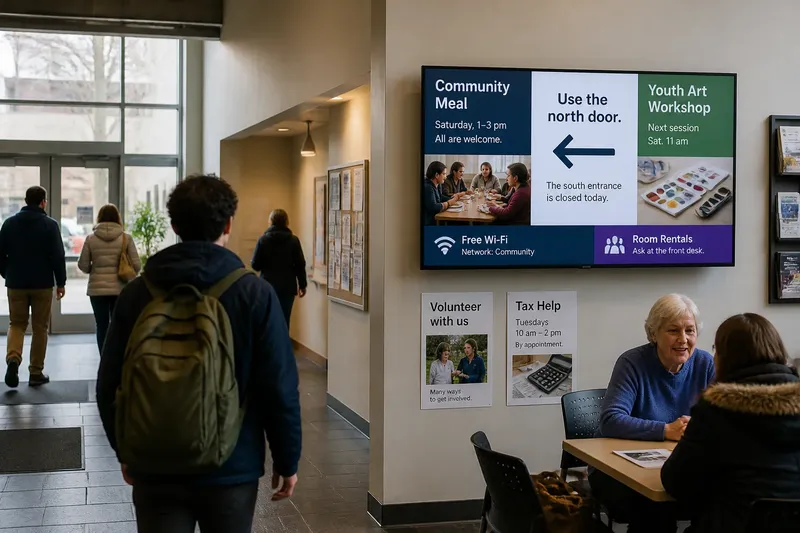
The Waiting-Room Screen Is Part of the Room
Learn how waiting-room screen placement, viewing distance, and surrounding light can make useful information easier to notice and less like visual clutter.

A patient looks up from a form, sees a screen above the reception desk, then turns away because the captions are too small to read from the chairs. Waiting-room screen placement can determine whether a display feels like useful room information or one more thing competing for attention.
The screen belongs to the room as much as its chairs, signs, and windows do. Its location affects who can see it, how long people can comfortably watch, and whether its content interrupts a conversation or a quiet wait. A good decision starts with the room’s actual patterns of use, not with an empty wall that happens to have power nearby.
Where should a waiting-room screen go?
Place a screen where people can notice it without having to turn sharply, crane their necks, or look through a staff work area. In many rooms, that means positioning it within the natural field of view from the main seating area, while leaving direct sightlines to reception, doors, and important signs clear.
Walk through the room as a visitor would. Enter, check in, choose a seat, and look around from several places, including a wheelchair-accessible space. Note where people tend to face and where they might glance while waiting. A screen visible only from one row of chairs is not serving the whole room.
Also consider what happens around the display. A screen beside a door may catch attention as people enter, but movement in the doorway can distract from its content. A screen directly behind reception may be easy to manage, yet visitors could mistake it for staff information or struggle to read it while speaking to a receptionist. Place it so the room’s main tasks remain easy.
Before installation, mark a proposed screen boundary on the wall with removable painter’s tape. Sit in likely viewing spots and check whether it blocks artwork, signs, a window, or a clock. The outline also gives staff and visitors a chance to comment before the fixture becomes permanent.
How far away should viewers sit?
Viewing distance is the space between a person’s eyes and the display. It matters because small text and fine details become harder to make out as distance increases. The right distance depends on the screen’s size, the content, the room layout, and how much time a visitor is likely to spend looking at it.
Consider the farthest seat the screen is meant to serve, not only the chair closest to it. If the display includes appointment guidance or directions, those words must be legible from the seats where a person could reasonably read them. If it shows broad images or short public announcements, visitors may need only to recognize the subject rather than read every detail.
Check legibility with the actual content displayed. A sample page with large headings can hide a problem that appears when the real layout includes smaller captions, a logo, or a ticker. Ask someone seated at different points to read a short line without leaning forward. If the text is difficult to read, revise the layout or reconsider the screen’s location rather than expecting visitors to move closer.
Say a clinic plans to place a screen on the wall facing a row of seats, with a second seating area around a corner. The team tapes out the proposed position and discovers that people in the second area cannot see it without turning away from the reception desk. Moving the display to a wall visible from both areas may make shared information easier to notice, while leaving a printed sign near the corner for details viewers need to read closely.
How high should a screen be mounted?
Mount a screen at a height that feels comfortable to seated viewers. A display mounted high above a doorway may be visible across the room, but visitors can end up looking upward for long stretches. A lower position can improve comfort, though it must remain clear of furniture, people walking through, and objects placed on nearby counters.
Think about the whole screen, not just its center point. Captions at the lower edge may be hidden by a person passing in front or by the heads of people in the nearest row. A screen tilted steeply downward may be awkward to view from seats at the sides. Look at the intended content from each common viewing position and check whether the image remains clear.
Mounting height also shapes the social feel of a room. A display placed over a staff member’s shoulder can make the space feel as though it is addressing people from a command point. A screen aligned more naturally with seated visitors can feel like part of the shared environment. The aim is not to make the display dominant; it is to make it accessible without turning it into the room’s visual center.
What makes a screen feel like clutter?
A screen begins to feel like visual clutter when it competes with other signals for attention. Nearby posters, bright windows, reflective surfaces, bold wall patterns, and multiple displays can all make it harder to know where to look. The problem is not simply that a screen is present. It is that its placement and appearance add noise without helping visitors understand what matters.
Look for visual competition from the seats. A bright window behind the display can make its image seem washed out. Glossy glass may reflect ceiling lights or a nearby window. A screen placed among several posters can disappear into the wall, while a large screen in an otherwise quiet room may draw more attention than its content deserves.
Reduce competition before adding stronger visual effects. Move a redundant poster, simplify the area around the display, or choose a less reflective position if one is available. Keep essential signs distinct from screen content, so visitors can still find the restroom, exit, or check-in point without waiting for a message to appear.
Brightness and motion matter, too. A screen that changes rapidly or glows conspicuously can pull attention away from quiet conversation. If the display is meant for occasional reference, a restrained presentation may fit the room better than constant movement. The screen should be noticeable enough to serve its purpose, but not so insistent that people feel obliged to watch.
How do lighting and glare affect visibility?
Room lighting changes how clearly a display can be seen. Direct sunlight, reflections from overhead fixtures, and strong contrast between a bright screen and a dim room can all make viewing uncomfortable. Check the screen during the different lighting conditions the room normally experiences, including daylight and the hours when overhead lights are on.
Stand or sit in the viewing positions that matter and look for reflected windows, lamps, and glossy surfaces. A small change in location or angle may reduce a reflection, but avoid solving glare by turning the screen toward only one section of the room. Curtains, blinds, or lighting adjustments may be relevant where staff can control them, though the display should remain readable without making the waiting area unpleasantly dark.
Use the display’s own settings thoughtfully. Excessive brightness can make a screen stand out harshly, while low brightness can make content hard to read in a bright room. Adjust the presentation to the space, then check the result from the seats rather than judging it from directly in front of the screen.
Should the screen face every seat?
One display rarely serves every seat equally well. A screen facing the main seating group may be comfortable for most visitors but hard to see from a side bench or a smaller waiting area. Trying to point it toward everyone can leave it positioned awkwardly for all.
Decide which information needs shared visibility and which information can be available in another form. A general welcome message or service update may be useful on a shared display. A detailed instruction that visitors must retain could also be offered on a printed handout or sign at the point where they need it. Alternative formats help people who prefer not to watch or who cannot see the screen clearly.
Do not assume that every visitor wants the display as a focal point. Some people may prefer to read, talk quietly, or look elsewhere while they wait. If the screen serves optional information, allow room for those activities. Avoid positioning it so that a viewer must face the display to sit comfortably or speak with staff.
How can a team check the placement before committing?
A simple room walk-through can reveal problems that a floor plan misses. Ask staff to observe the space during ordinary use, paying attention to where visitors sit, where queues form, and whether people need to turn away from a conversation to see the display. A brief trial with a temporary stand or taped wall outline can help the team assess the proposed sightlines without treating the arrangement as final.
- Check the entrance view. Can visitors locate the screen without confusing it with a directional sign?
- Check seated sightlines. Can people in the main seating areas see the content without twisting or leaning?
- Check accessible positions. Is the display visible from wheelchair spaces and other seats with different eye levels?
- Check text legibility. Can viewers read the actual content from the farthest intended seat?
- Check reflections. Do windows, fixtures, or glossy surfaces obscure the image from common seats?
- Check room activity. Does the screen compete with reception conversations, signs, or paths through the space?
- Check optional viewing. Can visitors choose another seat or direct their attention elsewhere?
For example, imagine a community health center considering a display beside its check-in counter. Staff tape the screen’s outline on that wall and ask a colleague to sit in the farthest chair, then repeat the check from a wheelchair space. They notice that the counter’s queue blocks the lower part of the screen during busy periods. Moving the proposed location to a side wall keeps the information visible without putting it directly behind the reception interaction.
What questions do people ask about waiting-room screens?
Can a waiting-room screen go above reception?
It can, if seated visitors can read it and the display does not interfere with face-to-face communication. Check whether people standing in line block the image and whether visitors can distinguish public information from staff-facing material.
Should a waiting-room screen be at eye level?
It should be comfortable to view from the seats it serves, rather than placed high simply to make it visible from a distance. Since eye level varies with seating and mobility, check the full image from several positions instead of relying on one viewer’s height.
How can glare on a waiting-room screen be reduced?
Look for reflected windows or lights from the seats, then consider a different position, a modest angle change, or an adjustment to controllable room lighting. Recheck the view across the room so that one group does not gain a clear image at the expense of everyone else.
Does every waiting room need a screen?
No. A screen is useful only if it makes relevant information easier to access than the room’s other options. If visitors can find what they need through clear signs, staff, or printed materials, adding a display may create more visual competition than value.
What should change if the room changes?
Furniture moves, partitions appear, and the busiest seats can shift as a service changes. A screen that once faced an open row may later be blocked by a brochure rack or a new queue. Recheck visibility after a meaningful change to seating or circulation, and when visitors regularly ask staff to repeat information that appears on the display.
These checks are about fit, not about making the screen the center of the room. Good waiting-room screen placement gives visitors a clear chance to see useful information while preserving comfortable seating, conversation, and the room’s other visual cues. If a display seems intrusive, the most helpful fix may be to change where it sits, what surrounds it, or how much attention its presentation asks for.